
Setting up your computer#
This chapter provides instructions for setting up your computer.
Computer hardware#
To execute the notebooks in this collection, it is highly recommended to use a computer with a CUDA compatible NVidia Graphics card with at least 4GB of memory. These notebooks were tests on a Windows 10 Laptop with an NVidia RTX 3050 Mobile GPU.
Setting up Python and Conda environments#
When working with Python, we will make use of many plugins and software libraries which need to be organized. One way of doing this, is by managing Conda environments. A conda environment can be seen as a virtual desktop, or virtual computer, accessible via the terminal. If you install some software into one Conda environment, it may not be accessible from another environment. If a Conda environment breaks, e.g. incompatible software was installed, you can just make a new one and start over.
See also
Install Mini-Forge#
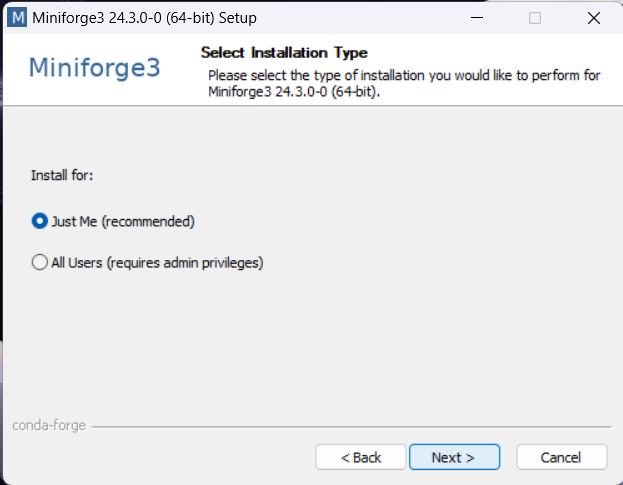
Download and install miniforge. We recommend the distribution miniforge of conda. If you already have an old [Ana]conda installation you haven’t touched for a while, it is recommended to uninstall it and install mini-forge instead.
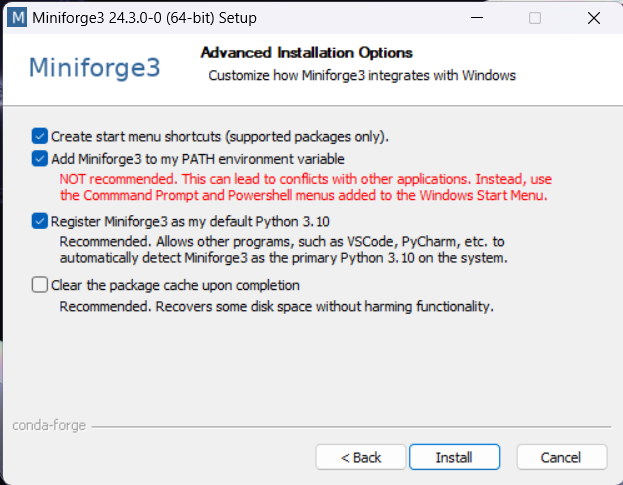
For ease-of-use, it is recommended to install it for your use only and to add Conda to the PATH variable during installation.
Setting up a conda environment#
You can create a conda environment using this commands from the terminal. It is highly recommended to install the GPU-version on a computer with an NVidia graphics card. The CPU version should work too, but some deep-learning notebooks may require a powerful GPU.
GPU version (recommended)#
conda env create -f https://raw.githubusercontent.com/haesleinhuepf/xai/main/docs/00_setup/environment-gpu.yml
CPU-only version#
conda env create -f https://raw.githubusercontent.com/haesleinhuepf/xai/main/docs/00_setup/environment-cpu.yml
Activating the environment#
Activate the environment:
conda activate xai
s